

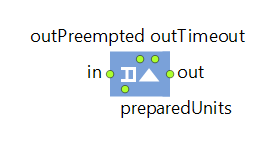
The Seize block captures a given number of resource units from a given ResourcePool block. Optionally, it sends the seized resources to a specified location. There are several ways to define the resource pools and units that the agent must seize. For more information about selecting resources, see the Using resources article.
Once the resource is granted, the agent leaves the block immediately. Use the Release block to release the resources. All seized resources must be released before the agent is disposed of.
The seized resource units are added to the LinkedList<Agent> resourceUnits collection of the agent. This list is publicly accessible, but it is not recommended that you modify it.
Seize embeds a Queue block in which the agents wait for the resources. The resource is requested for the first agent in the queue and, until it is granted (or that agent leaves the block for some other reason), the request for the next agent is not sent to the pool.
The rich interface of the Queue block (including the ability to use priorities, timeouts, remove agents, and so on) is fully exposed by Seize.
A set of resources may have multiple tasks with different priorities and preemption policies.
- If all tasks have the same priority, they will be executed in the usual way following their occurrence schedule. If there are enough resource units available, tasks can be executed simultaneously. If two tasks have the same priority, but one of them was suspended for some reason, this suspended task will be picked1.
- If you have configured no preemption policy for the tasks, these tasks will be executed one after another following their occurrence schedule. If there are enough resource units available, tasks can be executed simultaneously.
- The occurrence of one task does not reset the priorities for other tasks.
-
The suspended tasks from the individual queue of the resource unit have the highest priority.
This queue is formed by agents waiting in blocks that have the Task preemption policy set to Wait for original resource. -
After that, the suspended tasks from the queue of the ResourcePool block are processed.
This queue is formed by agents waiting in the blocks that have the Task preemption policy set to Seize any resource.
Once the suspended tasks from these queues are completed, the resource unit begins to process new tasks from their individual queues, and after that, the queue of the ResourcePool block.
If this order does not suit your needs, manually decrease the task’s priority by code, using the On task suspended action of the block.
If the agent is going to use the seized resource for a period of time and then release it, consider using the Service block, which is equivalent to a [Seize, Delay, Release] sequence.
- Seize
-
Define the seize mode: (alternative) resource sets or units of the same pool. For more details, see Using resources.
Name: seizeFromOnePool
Type: boolean -
[Visible if Seize: (alternative) resource sets]
Defines alternative resource sets. To add a new list, click Add list. The resource set is selected based on the availability of units. For more details, see Using resources.Type: ResourcePool[][]
Local variable: T agent — the agent -
[Visible if Seize: units of the same pool]
The ResourcePool block from where the resources are requested. For more details, see Using resources.Type: ResourcePool
Local variable: T agent — the agent -
[Visible if Seize: units of the same pool]
The expression that is evaluated to obtain the required number of resource units for the agent.Type: int
Local variable: T agent — the agent - Seize policy
-
Defines the policy of seize:
Seize whole set at once — The agent waits until a set becomes fully available and at that time it seizes all units.
Seize units one by one — The agent tries seizing units of any alternative set, once units become available. When a unit is seized, it may start some “preparation flowchart” while other units are not yet seized and even the resulting resource set selection is unknown, provided there are alternatives.Name: seizePolicy
Type: SeizePolicy
Default value: Seize.SEIZE_WHOLE_SET — Seize whole set at once
Valid values:
Seize.SEIZE_WHOLE_SET — Seize whole set at once
Seize.SEIZE_UNITS_ONE_BY_ONE — Seize units one by one - Queue capacity
-
[Visible unless the Maximum capacity option is selected]
The capacity of the embedded queue.Name: capacity
Type: int
Default value: 100
Set new value at runtime: set_capacity(new value) - Maximum queue capacity
-
If the option is selected, the capacity of the embedded queue is maximum possible (limited to Integer.MAX_VALUE).
Name: maximumCapacity
Type: boolean
Default value: false
Set new value at runtime: set_maximumCapacity(new value) -
If selected (true), the seized resources will be sent to the specified location.
Type: boolean
Local variables:
T agent — the agent
T unit — the resource unit - Destination is
-
[Visible if the Send seized resources option is selected]
Defines where the resources will be sent. Options are:Agent — resources are sent to the current agent location
Network node — resources are sent to the specified network node
Attractor — resources are sent to the specified attractor
Other seized resource unit — resources are sent to the current location of another seized resource (specified below in the Resource field)
Home of seized resource unit — resources are sent to the home location of the seized resource unit
(x, y, z) — resources are sent to the specified coordinatesName: destinationType
Type: Seize.DestinationType
Valid values:
Seize.DEST_ENTITY — Agent
Seize.DEST_NODE — Network node
Seize.DEST_ATTRACTOR — Attractor
Seize.DEST_RESOURCE — Other seized resource unit
Seize.DEST_RESOURCE_HOME — Home of seized resource unit
Seize.DEST_XYZ — (x, y, z) -
[Visible if Destination is: Network node]
The network node where the seized resources will be sent.Type: INode
Local variables:
T agent — the agent
T unit — the resource unit -
[Visible if Destination is: Attractor]
The attractor where the seized resources will be sent.Type: Attractor
Local variables:
T agent — the agent
T unit — the resource unit -
[Visible if Destination is: Other seized resource unit]
The name of the resource pool of the unit to whose location the agent will move. If several units of the same pool are seized, the first in the list will be chosen.Type: ResourcePool
Local variables:
T agent — the agent
T unit — the resource unit -
[Visible if Destination is: (x, y, z)]
The coordinates where the seized resources will be sent.Type: double
Local variables:
T agent — the agent
T unit — the resource unit -
If selected (true), the seized resources will be attached to the agent before the agent exits this block.
Type: boolean
Default value: false
Local variables:
T agent — the agent
T unit — the resource unit - Agent location
-
The space markup shape (node or path) for the embedded Queue block.
Name: entityLocationQueue
Type: AnimationStaticLocationProvider
-
The priority of the task for the incoming agent (the larger the higher).
Type: double
Default value: 0
Local variable: T agent — the agent -
If selected, the task may preempt the currently performed task (if allowed in the task properties and the task priority is lower).
Type: boolean
Default value: true
Local variable: T agent — the agent -
Defines the behavior for when a task arrives for the currently busy resource unit(s).
No preemption — The current task continues executing.
Wait for original resource — The task is interrupted and waits for the same resource unit to finish it.
Terminate serving — The task is interrupted and never continued.
Seize any resource — The task is interrupted and tries to seize any resource of the specified type, taking into account the restrictions applied by the Resource choice condition property.
Continue without resource — The task is finished without resources assistance.Type: TaskPreemptionPolicy
Default value: Seize.PP_NO_PREEMPTION — No preemption
Local variable: T agent — the agent
Valid values:
Seize.PP_NO_PREEMPTION — No preemption
Seize.PP_WAIT_FOR_ORIGINAL_RESOURCE — Wait for original resource
Seize.PP_TERMINATE_SERVING — Terminate serving
Seize.PP_SEIZE_ANY_RESOURCE — Seize any resource
Seize.PP_CONTINUE_WITHOUT_RESOURCE — Continue without resource - Auto suspend/resume agents
-
[Visible if Task preemption policy: Wait for original resource or Seize any resource]
This property defines whether the agent whose task is suspended should be automatically suspended in its current flowchart block and automatically resumed at the time there are available resources.Name: suspendResumeEntities
Type: boolean
Default value: true - Terminated task processing
-
[Visible if Task preemption policy: Terminate serving]
Defines what to do with the agent after the task is terminated:- Redirect to Enter block (specify the Enter block in the property below)
- Simply remove from flowchart
- Do nothing
Name: terminatedTaskProcessing
Type: Seize.TerminatedTaskAction
Valid values:
Seize.TERMINATED_SEND_TO_ENTER_BLOCK — Redirect to Enter block
Seize.TERMINATED_REMOVE_FROM_FLOWCHART — Simply remove from flowchart
Seize.TERMINATED_DO_NOTHING — Do nothing -
[Visible if Terminated task processing: Redirect to Enter block]
The Enter block for agents which lose all units obtained in this Seize block because of the Terminate serving preemption policy, when one of units in the resource set (defined in this Seize) gets grabbed by another task with higher priority.Type: Enter
Local variables:
T agent — the agent
T unit — the resource unit which has originated termination
- Customize resource choice
-
If the option is selected, you can select some specific resource units for the operation (using the Resource choice condition property below).
If the choice of tasks in your model belongs to the resources, you can use the Request choice condition option in the properties of the corresponding ResourcePool block.Name: customizeResourceChoice
Type: boolean
Default value: false -
[Visible if the Customize resource choice option is selected]
The Boolean expression that will be checked to find the specific resource unit(s) that may perform the operation. If none currently available resource unit(s) satisfy the specified condition (the condition returns false), Seize will wait for the first resource unit that matches the condition. Usually you define some field inside the agent type (say, myAssistant), store there the reference to the resource unit when it starts working with this agent (agent.myAssistant=unit), and then specify here the condition agent.myAssistant==unit enabling only this particular unit to continue working with this particular agent.Type: boolean
Default value: true
Local variables:
T agent — the agent
T unit — the resource unit
ResourcePool pool — the resource pool - Resource selection
-
Defines how the block selects a resource to perform the agent operation. If the Customize resource choice option is set, the resource will be selected from the subset returned by the algorithm in the Resource choice condition property. The possible options are:
Off (chooses some matching unit) — The dispatching policy is not applied.
Nearest to the agent — The resource nearest to the current agent will be selected.
Nearest to the agent by route (GIS) — The resource nearest to the current agent along the existing routes in GIS will be selected.
The most preferred — The resource will be selected by comparing resources to each other. The comparison algorithm should be placed in the "unit1 is preferred to unit2" property below.
Unit with top rating — The resource with the top rating will be selected. Define the rating (or the rating calculation algorithm) in the Resource rating property below.Name: dispatchingPolicy
Type: Seize.DispatchingPolicy
Local variables:
T agent — the agent
ResourcePool pool — the resource pool
Valid values:
Seize.RESOURCE_SELECTION_SOME_UNIT — Off (chooses some matching unit)
Seize.RESOURCE_SELECTION_NEAREST — Nearest to the agent
Seize.RESOURCE_SELECTION_NEAREST_BY_ROUTE — Nearest to the agent by route (GIS)
Seize.RESOURCE_SELECTION_BASED_ON_COMPARISON — The most preferred
Seize.RESOURCE_SELECTION_BASED_ON_RATING_VALUE — Unit with top rating -
[Visible if Dispatching policy: The most preferred]
The comparison algorithm (or its call) that is used for selecting a resource for the given agent. The algorithm compares resources to each other. It should return true if the resource unit1 has a higher preference than the resource unit2 (and false otherwise, including the case of choice equality). The algorithm should provide transitiveness.Type: boolean
Local variables:
T unit1 — the first resource unit to be compared
T unit2 — the second resource unit to be compared
T agent — the current agent -
[Visible if Dispatching policy: Unit with top rating]
The rating value of this resource unit. The rating is used to select a resource for the given agent (the larger the higher; a resource with the top rating value will be selected).Type: double
Default value: 0
Local variables:
T unit — the resource unit
T agent — the current agent - Define preparation tasks by
-
Defines how the preparation tasks are composed: by Connecting blocks or by Specifying list of blocks. Specify the ResourceTaskStart blocks below.
Name: taskStartBlocksAreConnected
Type: boolean
Default value: true — Connecting blocks - ResourceTaskStart blocks
-
[Visible if Define preparation tasks by: Specifying list of blocks]
The list of the ResourceTaskStart blocks that define the preparation tasks.Name: taskStartBlocks
Type: ResourceTaskStart[] - Enable exit on timeout
-
If the option is selected, the timeout option for the queue is on. After spending the specified time in the queue, the agent will leave the block through the outTimeout port.
Name: enableTimeout
Type: boolean
Default value: false -
[Visible if the Enable exit on timeout option is selected]
The expression that is evaluated to obtain the timeout time for the agent.Type: double
Default value: 100 seconds
Local variable: T agent — the agent - Enable preemption
-
If the option is selected, the agents are placed in the queue according to their priorities and may be preempted by higher priority ones.
Name: enablePreemption
Type: boolean
Default value: false - Canceled units
-
This property defines what should be done with units which have been seized by the time the agent is removed from this Seize block either by a timeout or preemption, or by the remove() function call. The units can:
- stay where they are
- return to home location
- go to Release (wrap-up)
Name: canceledUnitsBehavior
Type: Seize.CanceledUnitBehavior
Default value: Seize.CANCELED_UNITS_STAY_WHERE_THEY_ARE — stay where they are
Set new value at runtime: set_canceledUnitsBehavior(new value)
Valid values:
Seize.CANCELED_UNITS_STAY_WHERE_THEY_ARE — stay where they are
Seize.CANCELED_UNITS_RETURN_TO_HOME_LOCATION — return to home location
Seize.CANCELED_UNITS_GO_TO_RELEASE_WRAP_UP — go to Release (wrap-up) -
[Visible if Canceled units: go to Release (wrap-up)]
The Release block for units which have been seized but are canceled when the agent is removed from this Seize block either by a timeout or preemption, or by the remove() function call.Type: Release
Local variables:
T agent — the agent
T unit — the seized resource unit - Forced pushing
-
If the option is selected (true), the agents created by this block will be pushed further regardless of the state of the succeeding block.
Name: pushProtocol
Type: boolean
Default value: false - Restore agent location on exit
-
If option is selected, then after being animated in agent shape the agents will return to their original location (the node or path) where they were before entering this Seize block.
Name: restoreEntityLocationOnExit
Type: boolean - Force statistics collection
-
This block contains the internal queue that collects statistics on the queue size. If the statistics collection is turned off for all Process Modeling Library blocks in the model by the PMLSettings block, this option enables you to override this setting and collect the statistics for this specific block. Otherwise, the statistics will be collected regardless of this setting.
Name: forceStatisticsCollection
Type: boolean
Default value: false
- On enter
-
The code executed when the agent enters this flowchart block.
Local variable: T agent — the agent
- On exit (timeout)
-
[Visible if the Enable exit on timeout option is selected]
The code executed when the agent exits via the outTimeout port as a result of timeout event.Local variable: T agent — the agent - On exit (preempted)
-
[Visible if the Enable preemption option is selected]
The code executed when the agent exits via the outPreempted port as a result of preemption.Local variable: T agent — the agent - On seize unit
-
The code executed when a resource unit is seized.
Local variables:
T agent — the agent
T unit — the resource unit that is seized - On prepare unit
-
The code executed when a resource unit is prepared.
Local variables:
T agent — the agent
T unit — the resource unit that is seized - On exit
- The code executed when the agent exits the block normally, via the out port.
Local variable: T agent — the agent
- On task suspended
-
[Visible if Task preemption policy: Wait for original resource or Seize any resource]
The code executed when agent task is suspended because of the Wait for original resource and Seize any resource preemption policy, when its unit gets grabbed by another task with a higher priority.Local variables:
T agent — the agent
T unit — the resource unit - On task resumed
-
[Visible if Task preemption policy: Wait for original resource or Seize any resource]
The code executed when the agent resumes processing after it has been suspended because of the Seize any resource and Wait for original resource preemption policy.Local variables:
T agent — the agent
T unit — the resource unit - On task terminated
-
[Visible if Task preemption policy: Terminate serving]
The code executed when the agent loses all units obtained in this Seize block because of the Terminate serving preemption policy, when one of the units in the resource set (defined in this Seize) gets grabbed by another task with a higher priority.Local variables:
T agent — the agent
T unit — the resource that has caused the termination - On remove
-
The code executed when the agent is intentionally removed from this block by calling the remove() function of the agent. This code is automatically executed after the remove() function call.
Local variable: T agent — the agent
- Agent
-
Function Description int size() Returns the number of agents in the internal Queue block. T get(int index) Returns the agent from the specified position (0 is at the exit).
index — the position of the agent to getT remove(T agent) Removes the agent from the internal Queue block and returns it. If the agent was not in the block, returns null.
agent — the agent to removeT resume(T agent) Resumes the previously suspended agent in the internal Queue block. If the agent was not suspended, throws an error.
agent — the agent whose flowchart movement is to be resumedT suspend(T agent) Suspends the specified agent in the internal Queue block.
agent — the agent to suspend - Resource choice
-
Function Description void recalculateResourceChoiceConditions(T agent) Recalculates the choice conditions for the specified agent currently waiting in the internal Queue block. You can use this function when some resource units that previously were not available for Seize by a particular agent may have become available due to changed conditions. This function also recalculates conditions for the reserved units (the Seize whole set at once policy) but does not check the resource units that have already been seized (the Seize units one by one policy).agent — the agent whose choice conditions to recalculatevoid recalculateResourceChoiceConditions() Recalculates the choice conditions for all agents currently waiting in the internal Queue block. You can use this function when some resource units that previously were not available for seizure may have become available due to changed conditions. This function also recalculates conditions for the reserved units (the Seize whole set at once policy) but does not check the resource units that have already been seized (the Seize units one by one policy). - Task priority
-
Function Description void recalculateAgentPriority(Agent agent) Recalculates the task priority for the specified agent currently waiting in the queue of this block. This action may cause resource units to be preempted. If the Seize policy of this block is set to Seize units one by one and the agent has already seized one or more units, some of the resource sets needed to start a task may be discarded: namely, the sets that can no longer be completed due to the units currently seized. The priority recalculation does not reset the discarded resource sets. This means that the agent is only allowed to seize units that are needed to complete non-discarded resource sets.agent — the agent whose task priority is to be recalculated
If the queue of the Seize block has a limited capacity, recalculation will not affect the agents waiting to enter the Seize block.void recalculatePriorities() Recalculates the task priority for all agents currently waiting in the queue of this block. This action may cause resource units to be preempted. If the Seize policy of this block is set to Seize units one by one and the agent has already seized one or several units, some of the resource sets needed to start a task may be discarded: namely, the sets that can no longer be completed due to the units currently seized. Priority recalculation will not reset the discarded resource sets. This means the agent will only be eligible to seize units that are needed to complete the non-discarded resource sets.
Priorities are recalculated only for the agents currently waiting in the queue of the Seize block. If the queue of the Seize block has a limited capacity, the recalculation will not affect the agents waiting to enter the Seize block.
- Statistics
-
Function Description boolean isStatisticsCollected() Returns true if the block collects statistics.
- Wait queue
- The internal queue.
- in
- The input port.
- outTimeout
- The output port for agents leaving the block as a result of a timeout.
- outPreempted
- The output port for agents leaving the block as a result of a preemption.
- out
- The output port.
- preparedUnits
- The port for the prepared resource units that have completed their tasks. Should be connected to the last block of the “resources preparation flowchart”. This flowchart should start with the ResourceTaskStart block.
-
How can we improve this article?
-