


The ResourcePool block defines a set of resource units that can be seized and released by agents using the Seize, Release, Assembler, and Service flowchart blocks.
There are 3 types of resources:
- Static resources are tied to a specific location (that is, a node) within the network and cannot move or be moved. An example of a static resource would be an X-ray room or a weigh bridge.
- Moving resources can move on their own and can represent personnel, vehicles, and so on.
- Portable resources can be moved by agents or by moving resources. A portable U-sound device or a wheelchair would be an example of a portable resource.
Moving and portable resources have home locations to which they can optionally return or be returned. The resource units in a pool can have individual properties, can be animated, collect unit-based statistics, and so on. You can define your own resource type to represent staff, equipment, and so on. The agent uses the pool name to refer to the resource units, and can select a particular unit by analyzing the unit’s attributes.
Each resource unit can be either idle or busy. This block collects utilization statistics, which are continuous time statistics on the percentage of busy units. Resource units always collect their individual utilization statistics. You can also collect detailed statistics on the downtime of individual resource units, that is, the time that a particular unit has spent on maintenance, breaks, broken, or in user-defined downtime.
Moving resources do not recognize each other as obstacles and will move over each other, which does not correspond to reality. If you want to take collisions into account and model how moving resources resolve navigational conflicts, path-guided or free-space transporters would be a better choice.
There are a variety of possible operations with resource units supported by the Process Modeling Library: the agent can seize one or more units (Seize), release units (Release), send seized units to a specific location (ResourceSendTo), attach units so that they will move with the agent (ResourceAttach), and detach attached units (ResourceDetach). Whenever an operation is performed on multiple resource units, the list of their ResourcePool blocks is specified. For example, to seize two nurses and an X-ray room, you would specify Nurse, Nurse, XRay.
The requests from different Seize and Service blocks are queued in ResourcePool if they cannot be satisfied immediately. The queue can be simple FIFO or based on priorities.
A set of resources may have multiple tasks with different priorities and preemption policies.
- If all tasks have the same priority, they will be executed in the usual way following their occurrence schedule. If there are enough resource units available, tasks can be executed simultaneously. If two tasks have the same priority, but one of them was suspended for some reason, this suspended task will be picked1.
- If you have configured no preemption policy for the tasks, these tasks will be executed one after another following their occurrence schedule. If there are enough resource units available, tasks can be executed simultaneously.
- The occurrence of one task does not reset the priorities for other tasks.
-
The suspended tasks from the individual queue of the resource unit have the highest priority.
This queue is formed by agents waiting in blocks that have the Task preemption policy set to Wait for original resource. -
After that, the suspended tasks from the queue of the ResourcePool block are processed.
This queue is formed by agents waiting in the blocks that have the Task preemption policy set to Seize any resource.
Once the suspended tasks from these queues are completed, the resource unit begins to process new tasks from their individual queues, and after that, the queue of the ResourcePool block.
If this order does not suit your needs, manually decrease the task’s priority by code, using the On task suspended action of the block.
The capacity of this block (the number of units) can be defined directly as a number that you type into its Capacity property. Then, if you want to change the number of resources dynamically at the model runtime, you can use the set_capacity(new value) function. If the capacity is dynamically reduced by calling set_capacity(), but the number of currently seized units exceeds the new capacity, the extra units are not removed from the pool until they are released.
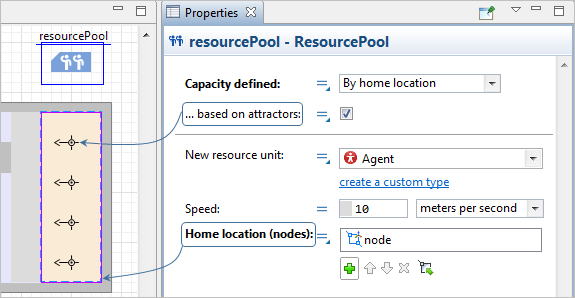
Another way to define capacity is by the home location of resources. The special space markup elements called nodes are used as the home locations for resources. Click the  button to add a node or click the
  first and then select a node in the graphical editor.
The number of nodes you add as home locations determines the capacity of the resources. You can even add the same node multiple times in this property.
In the figure below, you can see that the ...based on attractors option is also selected. Then the ResourcePool block will count the number of attractors in the home node and treat that number as the number of the resource units in this pool.
If you define the capacity both with multiple nodes as the home locations and with attractors in those nodes, the total number of resources will be the sum of all elements.
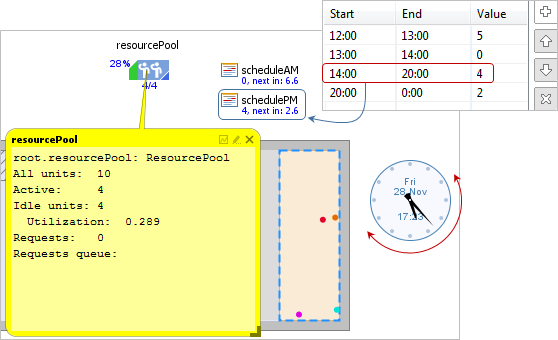
You can define a work schedule for your resources. There are four different ways to use the  Schedule element to define the capacity for the resources. The Schedule element is a part of the Agent palette. You can also add the Clock element from the Pictures palette to the agent diagram to keep track of time at the model runtime.
-
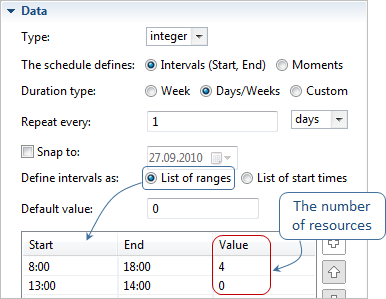
By schedule — With a schedule that defines how the number of resources changes over time (the schedule Type is integer). For each of the intervals that you define in the schedule, you must specify the number of the resources that are available during this interval.
-
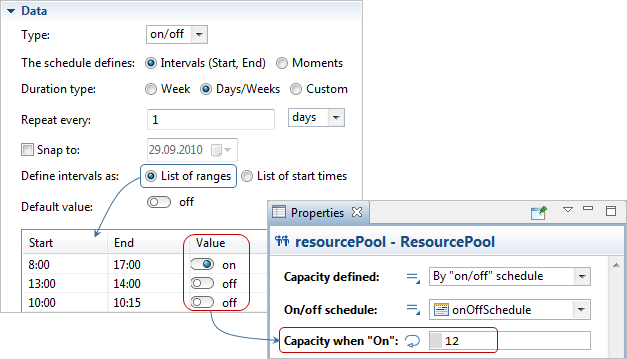
By "on/off" schedule — With a schedule that defines how resource availability changes over time (the schedule Type is on/off). Here you define the intervals and set the type of value for each time period, on or off. Then, in the ResourcePool properties, you specify the number of the resources available during the on intervals. During the off intervals, 0 resources are available.
-
By shifts: group schedules — In the ResourcePool properties, select multiple schedules of integer type in the Schedules property:
These schedules will all run at the same time creating the number of resource units according to the values in their intervals. You can create these schedules so that the shifts they define overlap or do not overlap: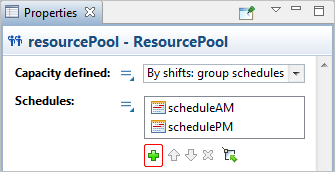
-
By shift plan — Define the capacity of resources in a schedule, but for different shifts, that is, a shift plan (for examples, see the shift plan Wikipedia page).
You define the number of resources for each shift in the ResourcePool property Shift group sizes { size1, size2, … }. In the example below, the shift with the ID 1 contains 10 resource units, the shift with the ID 2 contains 8 resource units, and the shift with the ID 3 contains 5 units. The IDs are a simple count starting from 1 and so on, i.e. you do not need to define these IDs anywhere.
Next, in the schedule of type integer, you assign a shift ID to each interval: the interval from 1 to 7 AM belongs to the shift with the ID 1. This means that during this interval, the number of resource units will be 10 as it is defined in the Shift group sizes { size1, size2, … } property.
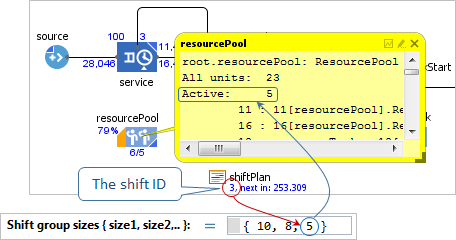
At the model runtime, the schedule shows the shift IDs: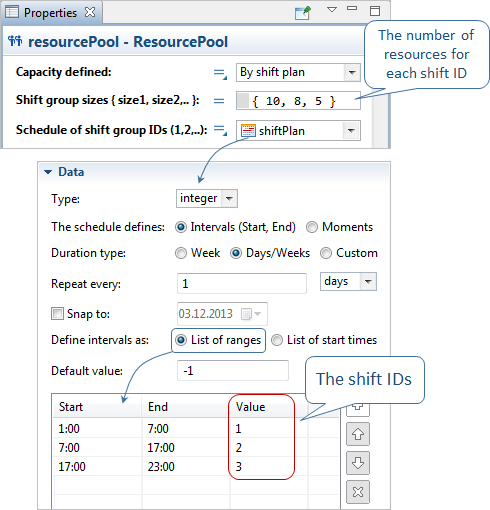
In all dynamic properties, the resource unit is available as the T unit local variable.
- Resource type
-
The type of the resource units in this pool: Static, Moving, Portable.
Name: type
Type: ResourceType
Default value: ResourcePool.RESOURCE_MOVING — Moving
Valid values:
RESOURCE_MOVING — Moving
RESOURCE_STATIC — Static
RESOURCE_PORTABLE — Portable - Capacity defined
-
Defines how the number of resource units is defined:
Directly — explicitly as a fixed number, in the Capacity field below.
By home location — by the home location nodes (equal to the number of nodes specified as Home location (nodes) or to the number of attractors inside these node(s), if the based on attractors option is selected).
By schedule — with a schedule that defines how the number of resources changes over time (the schedule Type is Integer).
By "on/off" schedule — with a schedule that defines how the resources availability changes over time (the schedule Type is on/off).
By shifts: group schedules — several schedules (Integer) define the resources’ capacity.
By shift plan — one schedule (Integer) defines the resources’ capacity for different shifts.Name: capacityDefinitionType
Type: ResourcePool.CapacityDefinitionType
Default value: ResourcePool.CAPACITY_DIRECT — Directly
Valid values:
ResourcePool.CAPACITY_DIRECT — Directly
ResourcePool.CAPACITY_HOME_LOCATION — By home location
ResourcePool.CAPACITY_SCHEDULE — By schedule
ResourcePool.CAPACITY_SCHEDULE_ON_OFF — By "on/off" schedule
ResourcePool.CAPACITY_SHIFT_GROUP_SCHEDULES — By shifts: group schedules
ResourcePool.CAPACITY_SHIFT_PLAN — By shift plan - Capacity
-
[Visible if Capacity defined: Directly]
The number of resource units in the pool.
Name: capacity
Type: int
Default value: 1
Set new value at runtime: set_capacity(new value) - When capacity decreases
-
[Visible if Capacity defined: Directly, By schedule, or By on/off schedule]
Defines what should be done with the excess units:units are preserved ('End of shift') — units are retained alive when the capacity of pool decreases (this is like their shift ends) and reactivated when capacity recovers.
units are destroyed — once the capacity of pool decreases, all the excess units will be destroyed (and removed from their population, if any), so for the next capacity recovery, brand new units will be created.Name: destroyExcessUnits
Type: boolean
Default value: false — units are preserved ('End of shift') - Based on attractors
-
[Visible if Capacity defined: By home location]
If selected, the number of resource units in the pool will be equal to the number of attractors inside the node specified as Home location (nodes) for this resource pool. Otherwise the number of resources is equal to the number of Home location (nodes).Name: capacityBasedOnAttractors
Type: boolean - Capacity schedule
-
[Visible if Capacity defined: By schedule]
The schedule that defines how the number of resources changes over time (the schedule Type is Integer).Name: capacitySchedule
Type: Schedule<Integer> - On/off schedule
-
[Visible if Capacity defined: By "on/off" schedule]
The schedule that defines how the resources availability changes over time (the schedule Type is on/off).
When the schedule value is off — there are no resources.
When the schedule value is on — there are Capacity when "On" resources.Name: capacityScheduleOnOff
Type: Schedule<Boolean> -
[Visible if Capacity defined: By "on/off" schedule]
The number of resource units in the pool when the schedule value is on.Type: int
Default value: 1 - Schedules
-
[Visible if Capacity defined: By shifts: group schedules]
Several schedules of the Integer type.Name: shiftGroupSchedules
Type: Schedule<Integer>[] - Shift group sizes { size1, size2,.. }
-
[Visible if Capacity defined: By shift plan]
The number of resources for each shift ID (delimited with commas).Name: shiftGroupSizes
Type: int[] - Schedule of shift group IDs (1, 2,..)
-
[Visible if Capacity defined: By shift plan]
The Schedule containing IDs of shiftGroups, where 1 is the first shift group.
Use -1 to mark a common out-of-shift time when all shiftGroups are off.Name: shiftGroupsPlan
Type: Schedule<Integer> -
The type of the resources in this resource pool. Referred below as T.
Default value: Agent
- Speed
-
[Visible if Resource type: Moving]
The speed with which the resource units move.Name: speed
Type: double
Default value: 10 meters per second - Home location (nodes)
-
Select the nodes that will be used as the home locations for these resources.
Name: homeNodes
Type: INode[] - Show default animation
-
[Visible if Resource type: Static]
If selected, and the resources are of the default Agent type (not of a user-created custom resource type), the static resources will be animated as small multi-colored circles. This option is mostly used to check that the static resources are correctly placed in the desired nodes.Name: showDefaultAnimationStatic
Type: boolean
- Specified by
-
Defines how to create the downtime tasks for your resource pool. The default option is a Downtime block(s): a list of Downtime blocks that describe the corresponding behavior. Alternatively, you can use the ResourcePool properties option to define the tasks from the ResourcePool block properties.
Name: downtimeSource
Type: ResourcePool.DowntimeSource
Set new value at runtime: set_downtimeSource(new value)
Valid values:
ResourcePool.DOWNTIME_LIST — Downtime block(s)
ResourcePool.DOWNTIME_RESOURCE_POOL_PROPERTIES — ResourcePool properties - Downtime block(s)
-
[Visible if Specified by: Downtime block(s)]
The list of the effective Downtime blocks.Name: downtimeList
Type: Downtime[]
Set new value at runtime: set_downtimeList(new value) - Maintenance
-
[Visible if Specified by: ResourcePool properties]
If selected, the resource units of this pool will have maintenance. The maintenance task parameters are configured using the properties below.Name: enableMaintenance
Type: boolean
Set new value at runtime: set_enableMaintenance(new value) -
[Visible if the Maintenance option is selected]
The time before the first maintenance.Type: double
Local variable: T unit — the resource unit -
[Visible if the Maintenance option is selected]
The time between maintenance tasks (starts counting when the maintenance task ends).Type: double
Local variable: T unit — the resource unit -
[Visible if the Maintenance option is selected]
The priority of the maintenance task. A higher value means a higher priority. It will be compared to other task priorities when making decisions what task may preempt other, and so on.Type: double
Default value: 100
Local variable: T unit — the resource unit -
[Visible if the Maintenance option is selected]
If selected, the maintenance task may preempt the currently performed task (if allowed in the task properties and the task priority is lower).Type: boolean
Local variable: T unit — the resource unit - Maintenance type
-
[Visible if the Maintenance option is selected]
Defines how to simulate the maintenance: simply as a delay (Delay) or as a complex process described by a specific flowchart (Send to flowchart).Name: maintenanceType
Type: ResourcePool.MaintenanceType
Valid values:
ResourcePool.MAINTENANCE_DELAY — Delay
ResourcePool.MAINTENANCE_FLOWCHART — Send to flowchart -
[Visible if Maintenance type: Send to flowchart]
The ResourceTaskStart block that defines the start of the flowchart simulating the resource maintenance process.Type: ResourceTaskStart
Local variable: T unit — the resource unit -
[Visible if Maintenance type: Delay]
The maintenance time.Type: double
Local variable: T unit — the resource unit -
[Visible if the Maintenance option is selected]
Defines whether to consider the maintenance time in the collected usage statistics as the “busy” time, the “idle” time, or to not take it into account at all.Type: ResourceUsageState
Default value: ResourcePool.USAGE_NOT_COUNTED — Not collected
Valid values:
ResourcePool.USAGE_BUSY — counted as 'busy'
ResourcePool.USAGE_IDLE — counted as 'idle'
ResourcePool.USAGE_NOT_COUNTED — not collected
Local variable: T unit — the resource unit - Failures / Repairs
-
[Visible if Specified by: ResourcePool properties]
If selected, the resource units of this pool will have failures. The failures are configured using the properties below.Name: enableFailuresRepairs
Type: boolean
Set new value at runtime: set_enableFailuresRepairs(new value) -
[Visible if the Failures / Repairs option is selected]
The time before the first failure.Type: double
Default value: uniform( 0, 1000 ) seconds
Local variable: T unit — the resource unit -
[Visible if the Failures / Repairs option is selected]
The time between failures; starts counting from the repair moment.Type: double
Local variable: T unit — the resource unit - Count busy time only
-
If selected, the time between failures (time to failure) is counted only when the resource is busy with a task. Otherwise, the time to failure is counted unconditionally.
Name: countBusyOnlyTimeToFailure
Type: boolean
- Repair type
-
[Visible if the Failures / Repairs option is selected]
Defines how to simulate the repair: simply as a delay (Delay) or as a complex process described by a specific flowchart (Send to flowchart).
Name: repairType
Type: ResourcePool.RepairType
Valid values:
ResourcePool.REPAIR_DELAY — Delay
ResourcePool.REPAIR_FLOWCHART — Send to flowchart -
[Visible if Repair type: Send to flowchart]
The ResourceTaskStart block that defines the start of the flowchart simulating the resource repair process.Type: ResourceTaskStart
Local variable: T unit — the resource unit -
[Visible if Repair type: Delay]
Time required to fix the failure.Type: double
Default value: triangularAV( 10, 0.1 ) seconds
Local variable: T unit — the resource unit -
[Visible if the Failures / Repairs option is selected]
Defines whether to consider the failures in the collected usage statistics as the “busy” time, the “idle” time, or to not take them into account at all.Type: ResourceUsageState
Default value: ResourcePool.USAGE_NOT_COUNTED — not collected
Valid values:
ResourcePool.USAGE_BUSY — counted as 'busy'
ResourcePool.USAGE_IDLE — counted as 'idle'
ResourcePool.USAGE_NOT_COUNTED — not collected
Local variable: T unit — the resource unit - Breaks
-
[Visible if Specified by: ResourcePool properties]
If selected, the resource units of this pool will have breaks. The breaks are configured using the properties below.Name: enableBreaks
Type: boolean
Set new value at runtime: set_enableBreaks(new value) - Breaks schedule
-
[Visible if the Breaks option is selected]
The schedule that defines the schedule of breaks for this resource pool (the schedule Type should be on/off).Name: breaksSchedule
Type: Schedule<Boolean> -
[Visible if the Breaks option is selected]
Defines the priority of the break task. A higher value means a higher priority.
When a break is scheduled to start, its priority is compared with the priority of the task currently executed by the resource. If the resource is executing a task with a higher priority, the break is postponed until that task is completed. The break duration itself does not change.
However, if the break is defined by a repeating schedule (for example, an “on”/“off” schedule), the subsequent “off” interval is shortened by the amount of time the break start was delayed. For example, if the “on” interval (break) is 2 hours and repeats every 10 hours (8-hour “off” interval), and a higher-priority task occupies the first hour of the “on” interval, then:- the break starts one hour later,
- it still lasts 2 hours,
- the following “off” interval becomes 7 hours instead of 8.
Type: double
Default value: 50
Local variable: T unit — the resource unit -
[Visible if the Breaks option is selected]
If selected, the break may preempt the currently performed task (if allowed in the task properties and the task priority is lower).Type: boolean
Default value: false
Local variable: T unit — the resource unit -
[Visible if the Breaks option is selected]
Defines whether the other tasks may terminate the current break (Terminate) or not (No preemption).Type: ResourcePreemptionPolicy
Default value: ResourcePool.PP_TERMINATE — Terminate
Valid values:
ResourcePool.PP_NO_PREEMPTION — No preemption
ResourcePool.PP_TERMINATE — Terminate
Local variable: T unit — the resource unit -
[Visible if the Breaks option is selected]
Defines whether to consider the break time in the collected usage statistics as the “busy” time, the “idle” time, or to not take it into account at all.Type: ResourceUsageState
Default value: ResourcePool.USAGE_NOT_COUNTED — not collected
Valid values:
ResourcePool.USAGE_BUSY — counted as 'busy'
ResourcePool.USAGE_IDLE — counted as 'idle'
ResourcePool.USAGE_NOT_COUNTED — not collected
Local variable: T unit — the resource unit - Custom tasks
-
[Visible if Specified by: ResourcePool properties]
If selected, you can define more tasks for the resources with the Downtime blocks. Use this option when your task cannot be defined with standard patterns provided for failures, breaks, or maintenance.Name: enableCustomTasks
Type: boolean
- List of tasks
-
[Visible if the Custom tasks option is selected]
The list of the Downtime blocks of Custom type that define additional custom tasks for these resources.Name: customTasks
Type: DowntimeDescriptor[]
Set new value at runtime: set_customTasks(new value) -
The priority of the shift schedule. A higher value means a higher priority.
Type: double
Default value: 100
Local variable: T unit — the resource unit -
Sets whether the End of shift task may preempt the task currently being executed, if any. In other words, true means that unit will “drop its work” right at the moment of its shift end. If false, then the unit will finish all its tasks with less priority.
Type: boolean
Default value: false
Local variable: T unit — the resource unit -
Defines whether the other tasks may terminate the current task (Terminate) or not (No preemption).
Type: ResourcePreemptionPolicy
Default value: ResourcePool.PP_NO_PREEMPTION — No preemption
Valid values:
ResourcePool.PP_NO_PREEMPTION — No preemption
ResourcePool.PP_TERMINATE — Terminate
Local variable: T unit — the resource unit
- Customize request choice
-
If the option is selected, the resource units will take into account the specified Request choice condition when accepting the task.
Name: customizeRequestChoice
Type: boolean
Default value: false -
[Visible if the Customize request choice option is selected]
A Boolean expression that will be checked before the resource unit(s) accepts the task. If none of the available tasks satisfy the specified condition (the condition returns false), the unit will remain idle. If the condition returns true, the resource unit will select the task with the highest priority.
Type: boolean
Default value: true
Local variables:
T agent — the agent
T unit — the resource unit
ResourcePool self — the resource pool - Add units to
-
Defines where the resource units created by this block will be stored: in the default population of the top-level agent of the model or in a custom population (specified below in the Population property). The default population (a Java collection of type AgentList) contained in the top-level agent can be accessed with the getDefaultPopulation() function.
Name: addToCustomPopulation
Type: boolean
Default value: false — default population -
[Visible if Add units to: custom population]
The name of the agent population where the units created by this block will be stored.Type: AgentList
Local variable: T unit — the resource unit - Force statistics collection
-
This block collects statistics, both for itself and the resource units it contains.
If the statistics collection is turned off for all Process Modeling Library blocks in the model by the PMLSettings, this option enables you to override this setting and collect the statistics for this specific block. Otherwise, the statistics will be collected regardless of this setting’s value.
For more information regarding the statistics collected by individual resource units, see the section on utilization statistics.Name: forceStatisticsCollection
Type: boolean
Default value: false
- On new unit
-
The code executed when a new resource unit is generated and can be used to do additional setup.
Local variable: T unit — a freshly created resource unit
- On destroy unit
-
The code executed when a resource unit is destroyed.
Local variable: T unit — the resource unit
- On seize
-
The code executed when a resource unit is seized.
Local variables:
T unit — the resource unit
T agent — the agent that seized the unit - On release
-
The code executed when a resource unit is released.
Local variables:
T unit — the resource unit
T agent — the agent - On wrap up
-
The code executed when a resource unit is wrapped up.
Local variables:
T unit — the resource unit
T agent — the agent - On unit state changed
-
The code executed when a resource unit changes its activity.
Local variables:
T unit — the resource unit
boolean busy — true if the unit is busy (this does not imply it was idle before), false if idle
ResourceTaskType type — the type of the current task (if the unit is busy); one of TASK_ENTITY, TASK_END_OF_SHIFT, TASK_WRAP_UP, TASK_BREAK, TASK_REPAIR, TASK_MAINTENANCE, TASK_CUSTOM
T agent — the agent associated with the task; relevant for TASK_ENTITY (the agent currently using the unit) and TASK_WRAP_UP (the agent that has just released it)
Downtime task — the task descriptor used for TASK_CUSTOM; refers to the Downtime block representing the current task - On maintenance start
-
[Visible if the Maintenance option is selected]
The code executed when a resource unit starts a maintenance task.Local variable: T unit — the resource unit - On maintenance end
-
[Visible if the Maintenance option is selected]
The code executed when a resource unit finishes a maintenance task.Local variable: T unit — the resource unit - On failure
-
[Visible if the Failures / Repairs option is selected]
The code executed when the failure task starts.Local variable: T unit — the resource unit - On repair
-
[Visible if the Failures / Repairs option is selected]
The code executed when the repair task ends.Local variable: T unit — the resource unit - On break start
-
[Visible if the Breaks option is selected]
The code executed when a resource unit starts break task.Local variable: T unit — the resource unit - On break end
-
[Visible if the Breaks option is selected]
The code executed when a resource unit finishes break task.Local variable: T unit — the resource unit - On break terminated
-
[Visible if the Breaks option is selected]
The code executed when break task is terminated.Local variable: T unit — the resource unit
- Resources and their utilization
-
Function Description int idle() Returns the number of currently idle resource units. Off-shift units are not counted. int busy() Returns the number of busy units, including those who are in wrap-up/maintenance/break/failure. Off-shift units are not counted. int size() Returns the total number of units in this resource pool (including those that are off shift). int sizeActive() Returns the total number of resource units in the current shift. boolean containsUnit(Agent unit) Checks whether the resource pool contains the specified unit. Returns true if it does, false otherwise.
unit — the agent (resource unit) to check fordouble utilization() Returns the utilization of this resource pool. The returned value is the mean over all individual unit utilization, calculated from the last resetStats() call to the current time. If the number and availability of resource units is defined by a schedule, the utilization is calculated only for the operating hours of the corresponding resource unit. Collection<ResourceRequest> getRequests() Returns the current queue of requests for resource units of this pool, ordered by their priority.
This list is unmodifiable.Iterator<Agent> iterator Returns the iterator over all units within this pool. - Shift groups
-
Function Description void setShiftGroupCapacity(int id, int capacity) Sets new size of shift group. Does not destroy excess resource units, instead assigns them out-of-shift task to them (idle units are pushed out-of-shift first, followed by units with lower priority tasks).
id — the unique identifier of the shift group (1, 2, 3, …)
capacity — the new size of the shift groupint sizeOfShiftGroup(int id) Returns the total number of units (including off-shift units) in the shift group with the given ID.
id — the unique identifier of the shift group (1, 2, 3, …) - Statistics
-
Function Description boolean isStatisticsCollected() Returns true if the block collects statistics. void resetStats() Resets the statistics collected for this block.
-
How can we improve this article?
-