

Agents may represent very diverse things: vehicles, units of equipment, projects, products, ideas, organizations, investments, pieces of land, people in different roles, etc.
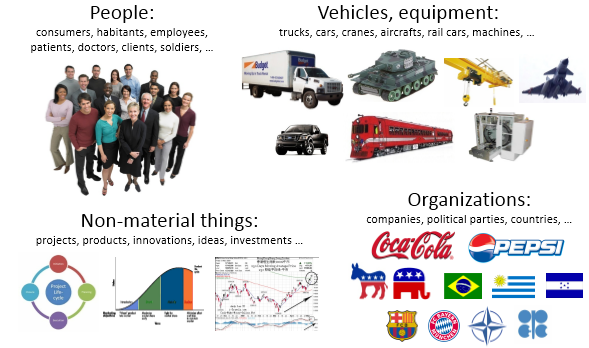
Agents are main building blocks of AnyLogic model. Agent is a unit of model design that can have behavior, memory (history), timing, contacts, etc.
Within an agent you can define variables, events, statecharts, System Dynamics stock and flow diagrams, you can also embed other agents, add process flowcharts. You can define as many agent types in your model as there are different types of agents.
Design of an agent typically starts with identifying its attributes, behavior, and interface with the external world. In case of large number of agents with dynamic connections (such as social networks) agents can communicate by calling functions.
The agent internal state and behavior can be implemented in a number of ways. The state of the agent can be represented by a number of variables, by the statechart state, etc. The behavior can be so to say passive (e.g. there are agents that only react to message arrivals or to function calls and do not have their own timing), or active, when internal dynamics (timeouts or system dynamics processes) of the agent causes it to act. In the latter case agents most probably would have event and/or statechart objects inside.
Agents may embed other agents to any desired depth. Embedded objects are instances of other agent types, embedded by each instance of this agent type. Embedding is the step to create the model hierarchy. By default embedded objects are displayed simply as  icon. But if you have drawn an icon for this agent type, this icon will be shown instead of the default one. Besides of shapes marked as icon shapes, icon also includes public ports and system dynamic variables.
Agent type can represent a single agent or a population of agents. A population represents a collection of agents of the same type.
At the top of the properties page of the agent population you can see the name of the agent type.
Agent is an instance of an agent type. Agent types are developed by the user. You create agents using the New Agent wizard that opens when you drag the  Agent element from the Agent palette on the diagram. On the first page of the wizard you choose whether you want to create a population of agents, just one agent, or only define the agent type and do not create any agents of this type as yet.
Below, you can see the properties of an agent type.
- General
-
Name — The name of the agent type.
Since AnyLogic generates a Java class for each agent type, follow the Java naming guidelines and start the name with an uppercase letter.Ignore — If selected, the agent type is excluded from the model.
- Parameters preview
-
The Parameters preview properties are available only when this agent type has any parameters.
You can rearrange the parameters of this agent. Agents of this type will list parameters in the property view in this well-defined order.
- Agent actions
-
On startup — The code to execute after all agents throughout the entire model have been constructed, connected, and initialized, and before anything else is done. This is a place for some additional initialization and starting agent’s activities such as events. The order in which the On startup code of different agents executes is not guaranteed.
On destroy — The code to execute when destroying an agent of this type (for example, when the user terminates the experiment and the root object is destroyed, the On destroy code of embedded agents is executed in some order).
On arrival to target destination — The code to execute when the agent arrives at the destination.
On before step — The code to execute for this agent before a step is taken in agent-based model with synchronization. The On before step actions are executed for agents in some deterministic order.
On step — The code to execute for this agent when taking a step in an agent-based model with synchronization. The On step actions are executed for agents in some deterministic order.
- Agent in flowcharts
-
This section of properties is visible unless the Flowchart block property in the Advanced section is selected.
Use in flowcharts as — The role of this agent in the flowchart. The possible options are: Agent, Resource Unit, Material Item, Transporter, Pedestrian, Rail Car, Train, or Car.
Depending on the selected role, you will have access to a role-specific API that extends beyond the API of a generic agent type.
By selecting Agent, you enable the agent to pass through the Process Modeling Library flowcharts.
By selecting Pedestrian, you enable the agent to move through the Pedestrian Library flowchart blocks and expose pedestrian-specific functions: getComfortableSpeed(), getDiameter(), getTargetX(), and so on.
If you select Transporter, you can use this agent as a transporter in Material Handling Library flowcharts and obtain transporter-specific functions like getFleet(), getUtilization(), getCargoPosition(), and so on.
If you do not expect agents of this type to go through any flowcharts in your model, just leave the default Agent option selected.On enter flowchart block — The code to execute when this agent enters the flowchart.
On exit flowchart block — The code to execute when this agent exits the flowchart.
On seize resource — The code to execute when this agent seizes the resource while being in the flowchart.
On release resource — The code to execute when this agent releases the resource while being in the flowchart.
- Dimensions and movement
-
This section of properties is visible unless the Flowchart block property in the Advanced section is selected.
Length — [Visible if the Use in flowcharts as property in the Agent in flowcharts section is set to Material Item or Transporter] The length of the material item or transporter.
Width — [Visible if the Use in flowcharts as property in the Agent in flowcharts section is set to Material Item or Transporter] The width of the material item or transporter.
Height — [Visible if the Use in flowcharts as property in the Agent in flowcharts section is set to Material Item or Transporter] The height of the material item or transporter.
Initial speed — The speed of the agent.
Rotate animation towards movement — If selected, the agent shape will be automatically turned towards the target during the agent movement.
Rotate vertically (incline on ramps) — If selected, the agent shape will also automatically incline forward or backward during the agent movement along inclined planes.
- Space and network
-
Agents in the space — Defines the list of agents that will live in this space.
Space type — [Enabled if there is no GIS map on the agent type diagram and the Space type is not GIS] The group of buttons, specifying the type of space:
- Continuous — A continuous space. The space dimensions are specified using the Width and Height properties. The continuous space allows the user to set and retrieve the current agent location, to move the agent with the specified speed from one location to another, and so on. The location of an agent in a continuous space is defined by the X, Y and Z coordinates of the Java double type.
- Discrete — A discrete space. The space is defined with a rectangular array of cells. Cells can be fully or partially occupied by the agents (at most, one agent in one cell). AnyLogic support for this kind of space includes agent distribution over the cells, moving to a neighboring cell or jumping to arbitrary cell, finding out who are the agent’s neighbors, and so on.
When you add a GIS map onto the graphical diagram of the agent, the space automatically switches to GIS. GIS space allows placing agents into a geospatial environment defined with a GIS map.Layout type — [Enabled if Space type: Continuous or Discrete] Defines the layout type (the way agents are initially located in the space).
AnyLogic supports the following standard continuous layouts:- User-defined — assumes you will take care of the agent locations yourself (for example, in the On startup code of the Main agent).
- Random — an agent location is chosen randomly and uniformly within the space dimensions.
- Arranged — the agents are arranged within the space dimensions.
- Ring — the agents are uniformly distributed on a ring whose diameter is smaller than the smallest space dimension.
- Spring mass — the agents are located as a spring mass system where agents are masses and their connections are springs. This is the network-dependent layout type.
Width — [Invisible if Continuous space type and User-defined layout is selected] The horizontal dimension of the area visualizing the space on presentation (in pixels). In discrete space, cell width is calculated by dividing the specified Width by the number of Columns in the space.
Height — [Invisible if Continuous space type and User-defined layout is selected] The vertical dimension of the area visualizing the space on presentation (in pixels). In discrete space, cell height is calculated by dividing the specified Height by the number of Rows in the space.
Columns — [Visible if Space type: Discrete] The number of columns in the discrete space.
Rows — [Visible if Space type: Discrete] The number of rows in the discrete space.
Neighborhood type — [Visible if Space type: Discrete] Sets a neighborhood model that determines the way the agent neighbors are defined in the discrete space. There are two options:
- Moore (8 neighbors) — The neighbors are counted in all 8 cells (to the north, south, east, west, northeast, southeast, southwest).
- Euclidean (4 neighbors) — The neighbors are counted in 4 cells (to the north, south, east, west) only.
Connection network type — [Enabled if Space type: Continuous or Discrete] The network type that defines how the agents are connected. This standard network does not mean the agents cannot have other connections. You are free to define any kind of relationships between agents and store and manage the corresponding references.
AnyLogic supports the following types of agent networks:- User-defined — assumes you will take care of the agent connections yourself (for example, in the On startup code of the Main agent).
- Random — agents are connected randomly with a given average number of connections per agent.
- Distance-based — any two agents are connected if the distance between them is less than a given maximum (in a continuous space only).
- Ring lattice — agent connections form a ring where an agent is connected to a given number of closest agents.
- Small world — can be considered a ring lattice where some links have been “re-wired” to long-distance agents.
- Scale-free — some agents are “hubs” with a lot of connections and some are “hermits” with few connections. A scale-free network is constructed according to “Barabasi, A. L. and R. Albert. 1999. Emergence of scaling in random networks. Science 286(5439): 509-512”. For details, please refer to Wikipedia.
Connections per agent — [Enabled if Connection network type: Random, Small world, or Ring lattice] The average (or exact) number of connections per agent. Applies to Random, Ring lattice, and Small world networks.
Connection range — [Enabled if Connection network type: Distance based] Defines the radius of the connection area for the agent. The agent will be connected to all agents, who are within a radius of defined Connection range.
Neighbor link fraction — [Enabled if Connection network type: Small world] A parameter for the Small world network type.
M — [Enabled if Connection network type: Scale-free] A parameter for the Scale-free network type, either M or M0 (starting number of hubs). For details, see Barabási–Albert model.
Enable synchronous steps — If selected, the agent-based modeling is synchronous. Synchronous modeling assumes discrete time steps, with agents (and possibly space) executing their actions synchronously at these time steps.
Synchronous steps are applied only to the agents and agent populations that are selected in the Agents in the space list above.Adding synchronization does not restrict the dynamics of your model with discrete time steps. Your agents (as well as other objects) can still schedule events, execute state transitions, and run other processes in parallel with step execution.
You can customize the step duration using the Step duration property. Space actions are defined using the On before step and On after step properties below.Step duration (in model time units) — [Enabled if Enable synchronous steps is selected] Specifies the custom step duration in the case of synchronous modeling. The default step duration is 1 model time unit.
- Advanced Java
-
Imports section — The import statements needed for the correct compilation of the class code. When Java code is generated, these statements are inserted before definition of the Java class.
Implements (comma-separated list of interfaces) — A comma-separated list of the interfaces that the class implements.
Additional class code — Arbitrary member variables, constants, and functions are defined here. This code will be inserted into the class definition. You can access these class data members anywhere within this agent. The functions can be called on some agent activity, such as event occurrence or triggering a statechart transition. While you can place any Java code here, we recommend to use the Java class element instead of defining nested classes here and use option lists instead of defining Java enumerations.
Parameterized type — If selected, you can define generic parameters for this agent type in the Type parameter field below.
- Advanced
-
Extends other agent — One agent type can extend another. This feature allows you to expose common functionality of different agent types in one place: the “base agent type”. All agent types that extend the same “base agent type” will share this functionality.
Log to database — If selected, all information about agents of this agent type (their parameter values, statistics on movement and time spent in different states, and so on) will be saved to the model execution log (if logging is turned on in the model’s Database properties).
Create datasets for dynamic variables — If selected, AnyLogic creates datasets for all dynamic variables (stock, flow, and dynamic variables) contained in this agent type. It also collects the specified number of the latest samples of these variables in these datasets (specified in the Limit the number of data samples up to first ... items property). Sample collection will start at either First update time (absolute), or at Update date, if you select Use calendar dates to define the first update time. Samples are collected at the specified Recurrence time, which you can set up below.
If this option is not set, you need to manually create a dataset for each dynamic variable.Recurrence time — [Enabled if Create datasets for dynamic variables is set] Defines the recurrence time for collecting samples of dynamic variables.
Limit the number of data samples — [Enabled if Create datasets for dynamic variables is set] Defines the number of samples stored in each dataset that AnyLogic automatically creates for dynamic variables.
Create toString() function with parameters — The toString() function displays information about the agent, for example, in the inspection window during the model run. Click this button to create a preset of the toString() function in your agent type. If your agent type has any parameters, the function automatically returns their names and values. To customize the output, specify what you want the function to return in the Function body box in the properties of the function. For more information on functions in AnyLogic, see Function.
The function will appear on the graphical diagram of the agent beyond the visible area. You will find it to the left of the axis origin.
-
How can we improve this article?
-