

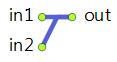
The FluidSelectInput block routes the flow from one of the two inputs to the output. The input is set in the Select property.
FluidSelectInput is a zero-capacity block, it does not contain any amount of fluid.
If required, you can set the Limited output rate option and define the upper limit for the rate in the Maximum output rate property. The specified rate cannot be lower than the value of Utils.RATE_TOLERANCE constant, that is, 1.0e-9. If the rate value falls below this value after recalculation, it will be snapped to 0.
The output batch of the FluidSelectInput block is the same as the one at the selected input. The On new batch… actions can be used to switch the input depending on the incoming batches.
The input selected at design time can be changed at runtime by calling the toggle() and select() functions.
For example, the block is named selectInput. To select the input 1 at runtime, execute selectInput.select(1). To select the input 2, execute selectInput.select(2).
Demo model: FluidSelectInput Open the model page in AnyLogic Cloud. There you can run the model or download it (by clicking Model source files). Demo model: FluidSelectInputOpen the model in your AnyLogic desktop installation.- Select
-
Defines whether the flow from Input 1 or Input 2 goes into the output. When the input 1 is selected, the input 2 is blocked, and vice versa. If the value is set to true, the flow goes from the input 1.
Name: selectInput1
Type: boolean - Limited output rate
-
If the option is selected (the value is equal to true), you can specify a custom upper limit of the output rate.
Name: limitRateOut
Type: boolean
Set new value at runtime: set_limitRateOut(new value) - Maximum output rate
-
[Visible and applies if the Limited output rate option is set]
The custom upper limit of the output rate.Name: maxRateOut
Type: double
Default value: 10 cubic meters / s
Set new value at runtime: set_maxRateOut(new value)
- Show batches in flowchart
-
If set, the block icon will display the current batch color.
Name: showBatchesInFlowchart
Type: boolean
- On new batch at input 1
-
The action executed when a new batch appears at the Input 1. It will not necessarily start flowing into the block. You can, for example, change the selected input in this action.
Local variable: Object batch — the batch
- On new batch at input 2
-
The action executed when a new batch appears at the Input 2. It will not necessarily start flowing into the block. You can, for example, change the selected input in this action.
Local variable: Object batch — the batch
- On rate change
-
The action executed when any of the flow rates changes.
Changing something in the action may result in another immediate rate change and immediately following another call of On rate change, so the user can possibly create a livelock.Local variables:
double in1rate — the current input rate at the in1 port
double in2rate — the current input rate at the in2 port
double outrate — the current output rate
- Selecting input
-
Function Description int toggle() Toggles the selected input. Returns 1 if input 1 becomes selected or 2 if input 2 becomes selected. void select(int input) Selects the specified input (input argument must be 1 or 2).
input — the input to select - Fluid amount
-
Function Description double amountPassed() Returns the total amount passed through the output port since the start of the simulation. double amountPassed(AmountUnits units) Returns the total amount of fluid (in given units) passed through the output port of the block since the start of the simulation.
units — the amount units - Flow rate
-
Function Description double currentRate() Returns the current flow rate of fluid that goes out. double currentRate(FlowRateUnits units) Returns the current flow rate (in given units) of fluid at the block output.
units — the flow rate units - Resetting statistics
-
Function Description void resetStats() Resets statistics collected for this block, including the statistics collected for its ports.
- in1
- The upper input port, Input 1.
- in2
- The lower input port, Input 2.
- out
- The output port.
-
How can we improve this article?
-